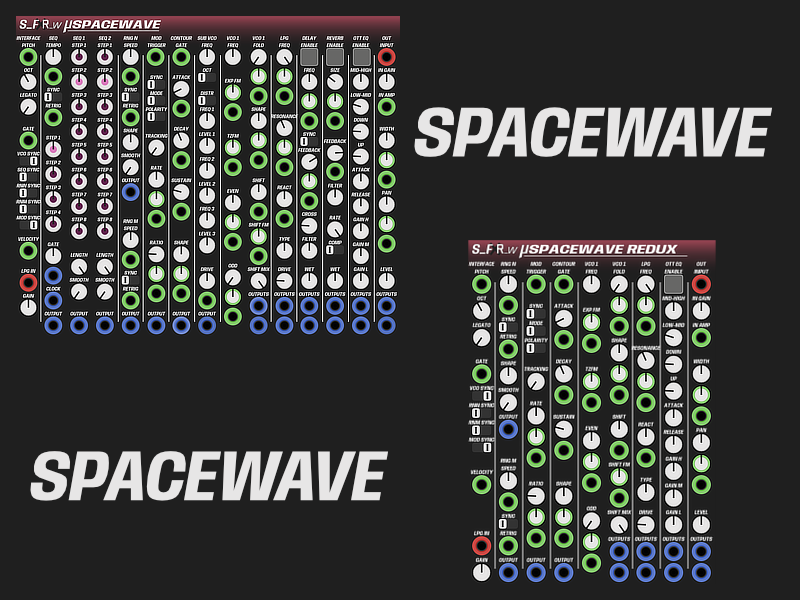








































Micro Voice SpaceWave
West-coast inspired monophonic synth voice for immediate creative sound design. Dual sequencers, noise generators, modulation envelopes, two oscillators, and a complete effects suite create rich, evolving sounds.
MANUAL
INTERFACE
- PITCH CV
- 1V/Octave pitch CV input
- OCT Knob
- Set the base octave
- LEGATO Knob
- Set the time overlapping notes glide in pitch
- GATE CV
- Gate input that controls the Contour and Modulator
- VCO SYNC Switch
- Retrigger the VCO when a new gate is received
- SEQ SYNC Switch
- Retrigger the Sequencers when a new gate is received
- RNN SYNC Switch
- Retrigger the RNG N when a new gate is received
- RNM SYNC Switch
- Retrigger the RNG M when a new gate is received
- MOD SYNC Switch
- Retrigger the Modulator when a new gate is received
- VELOCITY CV
- Controls the output amplitude velocity/level
- NOTE: the CV is sampled and held when a new gate is received
- LPG IN
- External audio input that feeds into the LPG input (normals to Sub-VCO; patch any jack to break)
SEQUENCERS
Two inter-dependent sequencers with independent length and step values. A super-sequencer switches between both.
MAIN
Main Sequencer controls tempo and syncing of SEQ1 and SEQ2 and can create a super-sequence mixing both sequencers
- TEMPO Knob (with exp CV)
- Set the master clock rate
- SYNC Switch
- FREE/SYNC: tempo is set in Hz or synced to host BPM
- RETRIG CV
- Re-triggers the sequencers
- STEP 1-4
- Set which steps are run from which sequencer for the super-sequence
- GATE Knob
- Set the relative gate length for the GATE CV Output
- CLOCK Output
- Output a trigger for every clock cycle (new step)
- OUTPUT Output
- Outputs the super-sequence
SEQ1 and SEQ2
- STEP 1-8 Knobs
- Set the step value for each step
- LENGTH Knob
- Set the individual sequencer length in steps
- NOTE: Sequencer runs to the set step number and then repeats from start
- SMOOTH Knob
- Smooths the sequencer output from stepped to a continuous modulation output
- OUTPUT output
- Outputs the individual sequencer output
RANDOM GENERATORS
Random-N (Noise-Based)
- SPEED Knob (with exp CV)
- Set the rate of new random values
- SYNC Switch
- FREE/SYNC: rate is set in Hz or synced to host BPM
- SHAPE Knob
- shapes towards more center values (left) or more boundary values (right)
- SMOOTH Knob
- Smooth the output into a continuous waveform
- OUTPUT CV
- Direct output of the noise generator
Random-M (MAP-Based, smooth)
- SPEED Knob (with exp CV)
- Set the rate of random value generation
- SYNC Switch
- FREE/SYNC: rate is set in Hz or synced to host BPM
- OUTPUT
- Direct output
MODULATOR
Flexible high-speed AD envelope that operates as a single-shot envelope or free-running LFO.
- SYNC Switch
- FREE/SYNC: rate is set in Hz or synced to host BPM
- MODE Switch
- AD: single-shot envelope (trigger starts)
- LFO: free-running oscillator (trigger restarts)
- UNIPOLAR/BIPOLAR Switch
- Switch between UNIPOLAR and BIPOLAR output
- TRACKING Knob
- Strength of the pitch tracking for the modulator rate to the base pitch
- RATE Knob
- Set the Modulator speed
- RATE CV
- Exponential CV input to modulate the rate
- RATIO Knob (with CV)
- Ratio between Attack and Decay phase
- OUTPUT
- Direct output of the modulator signal
CONTOUR
ADR Envelope Generator
- GATE CV
- Gate signal for the contour to process
- ATTACK Knob (with CV)
- Set the attack time of the contour
- DECAY Knob (with CV)
- Set the decay time of the contour
- SUSTAIN Knob (with CV)
- Set the sustain level of the contour
- SHAPE Knob (with CV)
- Shape the Contour from pronounced to relaxed
- OUTPUT
- Output the raw contour signal
SUB-VCO
Mono additive oscillator with harmonic partials for depth and richness.
- FREQ Knob
- Fine-tune the base frequency
- OCTAVE Switch
- Set the Sub-VCO octave relative to the base pitch
- DISTR Switch
- ODD: odd harmonics
- EVEN: even harmonics
- FULL: full harmonic spectrum
- HARMONIC 1-3 LEVEL Knob
- Individual scaled level for each harmonic
- HARMONIC 1-3 FREQ Knob
- Individual scaled frequency offset for each harmonic
- DRIVE Knob (with CV)
- Add soft saturation to the output
- OUTPUT
- Direct output of the Sub-VCO signal (mono)
VCO
Stereo westcoast oscillator with harmonic shape control, wavefolder, and quadrature shifter
- FREQ Knob
- Set the base frequency (default: C2, 65.4 Hz)
- EXP FM CV
- Exponential frequency modulation
- TZFM CV
- Through-Zero Frequency Modulation
- EVEN Knob (with CV)
- Morph from sine toward triangle-ish (negative) or square-ish (positive)
- ODD Knob (with CV)
- Morph toward sawtooth-ish
- FOLD Knob (with CV)
- Increase wavefolder amount
- SHAPE Knob (with CV)
- Shape the wavefolder from triangle-ish to regular to square-ish
- SHIFT Knob (with CV)
- Quadrature shifter
- Exponential CV modulation and Liner CV modulation (with attenuator)
- SHIFT MIX Knob
- Blend between shifted and non-shifted signal
- OUTPUT
- Direct output of the VCO signal (stereo)
LOWPASS GATE (LPG)
Stereo non-linear filter and amplitude envelope combined.
- TYPE Knob
- Blend from ALLPASS (left) to LOWPASS (middle) to BANDPASS (right)
- FREQ Knob (with CV)
- Set the filter frequency
- FREQ CV
- Modulate the filter frequency
- NOTE: frequency CV is smoothed vactrol-style by the REACT knob
- RES Knob (with CV)
- Set the filter resonance
- NOTE: at high values, the filter self-oscillates
- RES CV
- Modulate the resonance
- REACT Knob
- Set the reaction time constant (how quickly the FREQ CV is tracked)
- DRIVE Knob
- Drive the filter into saturation for harmonic character
- OUTPUT
- Direct output of the LPG signal (stereo)
DELAY
Stereo delay with tempo sync and feedback filtering.
- ENABLE Toggle Button
- Turn the delay on or off
- FREQ Knob (with CV)
- Set the delay time in milliseconds
- NOTE: CV modulation bypasses the knob smoother for full audio-rate modulation
- FREQ CV
- Modulate the delay time linearly
- SYNC Switch
- FREE/SYNC: time is set in milliseconds or synced to host BPM as a note division
- FEEDBACK Knob
- Set the feedback amount
- CROSS Knob
- LR cross-feed in the feedback path
- FILTER Knob
- One-pole lowpass/highpass filter in the feedback path
- WET Knob
- Dry/wet signal ratio
REVERB
Stereo reverb with modulation.
- ENABLE Toggle Button
- Turn the reverb on or off
- SIZE Knob (with CV)
- Modulate the reverb space size
- FEEDBACK Knob
- Set the feedback coefficient
- FILTER Knob
- One-pole lowpass/highpass filter in the feedback path
- RATE Knob
- Control the samplerate of the reverb
- COMP Switch
- Auto-compensate the samplerate reduction with reverb size
- WET Knob
- Dry/wet signal ratio
OTT EQ
3-band EQ with OTT-style multiband compression.
- MID-HIGH FREQ Knob
- Set the mid/high crossover frequency
- LOW-MID FREQ Knob
- Set the low/mid crossover frequency
- UP Knob
- Depth of upward compression per band
- NOTE: 0 = no compression, 1.0 = full compression
- DOWN Knob
- Depth of downward compression per band
- NOTE: includes auto make-up gain to compensate for reduction
- ATTACK Knob
- Attack time of the compressors
- RELEASE Knob
- Release time of the compressors
- GAIN H Knob (with CV)
- Boost or cut the high band (±12 dB)
- GAIN M Knob (with CV)
- Boost or cut the mid band (±12 dB)
- GAIN L Knob (with CV)
- Boost or cut the low band (±12 dB)
OUTPUT STAGE
External Input
- INPUT
- Input jack for feeding external input into the output stage
- Example: Can be used to route SUB VCO into output stage
- IN GAIN Knob
- Gain adjustment of the input jack
Panning
- PAN Knob (with CV)
- Pan the stereo signal left/right
- WIDTH Knob
- Set the stereo width (0 = mono, 1.0 = full stereo)
Output
- LEVEL Knob
- Set the overall output level
- STEREO OUTPUT
- Output the processed stereo signal
NORMALLED CONNECTIONS
Out of the box, SpaceWave is playable without patching:
| Source | → | Destination | Purpose |
|---|---|---|---|
| Seq Gate Out | → | Gate CV | Trigger contour and modulation |
| Seq1 Out | → | Pitch CV | Play melodies |
| Rng-N Out | → | VCO EVEN CV | Noise texture (triangle/square) |
| Rng-M Out | → | VCO ODD CV | Noise texture (sawtooth) |
| Modulator Out | → | VCO FOLD CV | Timbral evolution (envelope-driven) |
| Contour Out | → | LPG Freq CV | Classic subtractive filter sweep |
| Sub-VCO Out | → | VCO TZFM CV | Audio-rate linear through-zero FM for harmonic richness |
| Sub-VCO Out | → | LPG IN CV | Feed Sub-VCO into filter input |
Patching any input jack breaks the normals on that connection.
No reviews yet. Be the first to review this product!