








































-
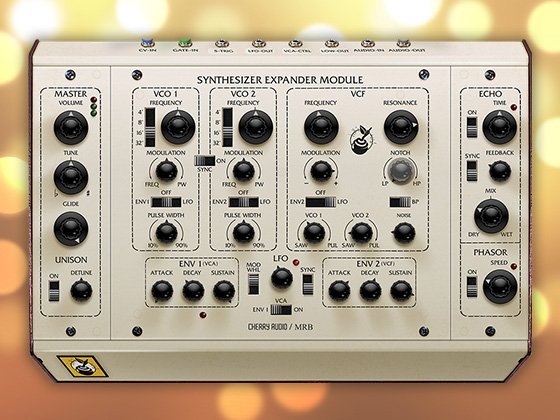
PolyHarmonix is semi-modular analog polyrhythmic synthesizer that uses mathematical ratios to tune its four subharmonic oscillators, and to control the timing of its four rhythm generators based on Subharmonicon with some added features.
-
It's sold individually and as part of INSTRUMENTS BUNDLE.
-
2 VOLTAGE CONTROLLED OSCILLATORS (VCOs) Each VCO features two additional subharmonic oscillators.
-
TWO 8-STEP SEQUENCERS Each sequencer controls any combination of its associated VCO, SUB 1, and SUB 2.
-
POLYRHYTHM SECTION: 8 RHYTHM GENERATORS Each rhythm generator can be set to drive a single sequencer or both.
-
RESONANT MOOG FILTER 4-pole (-24 db/octave) featuring low-pass, high-pass, band-pass, band-reject Moog ladder filter.
-
2 ENVELOPE GENERATORS Two Attack/Decay envelope generators control the VCF and VCA.
-
PATCHING 40-point modular patchbay offering 24 inputs and 16 outputs.
-
VCOs FREQ Rotating this knob will set the initial frequency. The range of this knob is four octaves. Rotating the VCOs FREQ knob fully counterclockwise will specify the initial pitch as Middle C (262 Hz) on a piano. Rotating this knob fully clockwise will specify the initial pitch as the highest C (4186 Hz) on a piano. NOTE: Engaging the QUANTIZE settings will limit the available values for the VCOs FREQ knob to the specific scale steps set by the current value of the QUANTIZE button.
-
SUBs FREQ The frequency of the first subharmonic oscillator of VCO 1 is derived from the initial frequency of VCO 1. The SUB 1 frequency is equal to the initial pitch of VCO 1, divided by a whole number integer value from 1 to 16. As you rotate the SUB 1 FREQ knob, you are actually selecting the integer value used. You can hear the pitch of SUB 1 change in stepped values, starting with 1 when this knob is rotated fully clockwise, and proceeding in steps to a value of 16 as this knob is rotated counterclockwise. Each one of these values produces a note on the undertone scale derived from the initial pitch of VCO 1.
-
WAVEFORM (VCO 1, VCO 2) The waveform being output by VCO 1, SUB 1, and SUB 2 and VCO 2, SUB 1, and SUB 2 is determined by this three-position switch. UP: In this highest position, a square wave is output from VCO 1, SUB 1, and SUB 2. Square waves produce a hollow sound, providing a rich starting point for nasal clarinet and bass sounds. MIDDLE: The middle position is a special case. With the switch in this position, SUB 1 and SUB 2 will both output sawtooth waves. However, VCO 1 will output a square (pulse) wave. By default, the sawtooth output of SUB 1 is normalled for use as a PWM (Pulse Width Modulation) source for the square wave of VCO 1. PWM can change the width of the pulse wave, altering its timbre which is popular for creating string-type sounds. DOWN: In this lowest position, a sawtooth wave is output from each. In addition to creating thick, brassy sounds, the sawtooth wave also lends itself to powerful lead and bass sounds. NOTE: The normalled connection described above can be overridden by connecting a control signal to the VCO 1 PWM, VCO 2 PWM input jack of the patchbay.
-
When the Quantize function is engaged, rotating the VCO 1 FREQ knob or the VCO 2 FREQ knob will select steps of the scale, as defined by the current Quantize setting. The Quantize function is available for both oscillators independently. 12-ET: This option selects a Chromatic (12-step) scale using Equal Temperament (ET), which is the basis for Western keyboard music. 12-JI: This quantize option uses a Chromatic (12-step) scale using Just Intonation (JI). NOTE: By default, the SEQ 1 and SEQ 2 output jacks will output a control voltage that reflects the current Quantize settings.
-
The mixer sets the individual levels of all six Subharmonicon sound sources. The combined signal exits the mixer and enters the filter section. Switch (SUM / MULT) to change the behavior of the mix : SUM for adding all VCO 1 oscillators outputs with the ones of VCO 2 while MULT for multiplying all VCO 1 oscillators outputs with the ones of VCO 2 obtaining a sort of ring effect modulation. NOTE: The mixer can be pushed into a warm distortion by setting the sound sources near their maximum levels while setting the mixer to moderate levels will produce a cleaner sound.
-
PolyHarmonix contains two identical sequencers. Each sequencer features four individual steps. Each step includes a variable tuning knob and an LED to indicate the current active step. Sequencer 1 is tied internally to OSC 1 and the subharmonic oscillators associated with OSC 1, and Sequencer 2 is tied internally to OSC 2 and the subharmonic oscillators associated with OSC 2.
-
SEQ 1 ASSIGN (VCO 1)
These buttons allow the output of Sequencer 1 to be assigned to control the pitch of OSC 1 (VCO 1), the integer value of SUB 1, the integer value of SUB 2, or any combination of the three. OSC 1: When this button is engaged (lit), the output of Sequencer 1, as defined by the positions of the four STEP knobs, will modify the value of the VCO 1 FREQ knob. The pitch of SUB 1 and SUB 2 will also change, as they maintain their constant harmonic relationship to VCO 1. SUB 1: When this button is engaged (lit), the output of Sequencer 1, as defined by the positions of the four STEP knobs, will modify the integer value of the SUB 1 FREQ knob. When this button is off (unlit), SUB 1 will continue to play using the setting of the SUB 1 FREQ knob, maintaining a constant harmonic relationship to VCO 1. Same for SEQ 2ASSIGN (VCO 2). -
SEQ OCT This function specifies the octave range available for each of the STEP knobs in the sequencers. There are three values for this parameter. Repeatedly pressing the SEQ OCT button will cycle through the available options, with an LED indicating the current selection. ±5: This option provides five octaves above and five octaves below the current ±2: This option provides two octaves above and two octaves below the current ±1: This option provides one octave above and one octave below the current VCO FREQ knob value for each individual step.
-
EG The EG (Envelope Generator) button has three settings; Off (button is unlit), On (button is lit), and Held (button blinks). OFF: This setting prevents the individual sequencer steps from triggering the EGs. The TRIGGER button and external trigger pulses continue to trigger the EGs, and are passed to the TRIGGER output jack. ON: This setting allows the individual sequencer steps to trigger the EGs. All of the manual triggers, external triggers, and triggers created by the sequencers are passed to the TRIGGER output jack. HELD: Briefly hold the EG button until it begins to blink to select the Held setting. When the EG button is blinking, the VCF EG and VCA EG are held open at their maximum values until the EG button is pressed once again. With playback stopped (PLAY button unlit), the NEXT button can be used to advance to the next sequencer step. This allows you time to manually tune each VCO and each subharmonic oscillator with precision, as well as each sequencer step, based on the SEQ 1 ASSIGN and SEQ 2 ASSIGN buttons.
-
Subharmonicon contains 8 independent, but identical, rhythm generators. In short, each rhythm generator creates a new rhythm by dividing the current tempo by an integer value from 1 to 16, selected by a dedicated RHYTHM knob. This new rhythm is then superimposed onto Sequencer 1, Sequencer 2, or both, via the SEQ 1 and SEQ 2 buttons associated with each Rhythm Generator.
No reviews yet. Be the first to review this product!
Title of Song
-
Nrgzr78_PolyHarmonix_Demo1
-
Nrgzr78_PolyHarmonix_Demo2
PolyHarmonix
$25.00