















































Mono Poly Remote
Poly2Mono, Mono2Poly, poly/16 channel mono attenuverter, poly/16 channel mono DC source, 16 channel remote control and a 2 channel oscilloscope - all in one module.
Take a polyphonic signal, override or modulate channels with a monophonic signal, use other channels to remote control parameters on other modules, and patch the polyphonic output to an oscillator, filter mod or whatever you like. All that while having control over the amplitude and offset of each of the 16 channels.
Overview
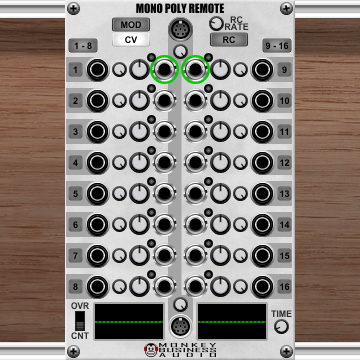
Mono Poly Remote is a 16-channel utility module. Each channel processes one signal and produces one output. All 16 outputs are also bundled into a polyphonic output jack.
Every channel takes:
- one poly voice from the polyphonic input (if connected), and/or
- one mono input
and produces:
- one mono output and
- one poly voice on the polyphonic output
Each channel has independent scale (attenuverter) and offset (DC bias) controls, scale and offset mudulation amounts and can optionally remote-control a parameter on any other module in the patch.
Signal Flow
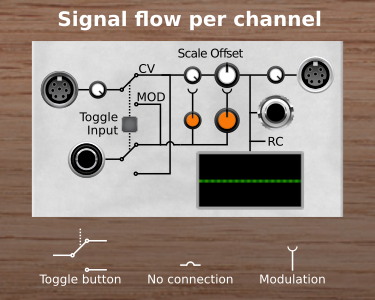
For each channel n:
- The poly input provides polyphonic signal (scaled by the global Poly In knob).
- The mono input provides monophonic signal
- Toggle input next to the mono input jack swaps carrier and modulator:
- Toggle off: The mono signal modulates the Scale and Offset of the poly voice.
- Toggle on: The poly voice modulates the Scale and Offset of the mono signal.
- The Scale knob attenuates or inverts the signal (−1.0 … +1.0; default 1.0).
- The Offset knob adds a DC bias (−5 V … +5 V; default 0 V).
- The Scale Mod knob sets the modulation depth of the Scale value (−100% … +100%; default 0%).
- The Offset Mod knob sets the modulation depth of the Offset value (−100% … +100%; default 0%).
- The resulting output is sent to the mono output jack, the polyphonic output (scaled by the global Poly Out knob), and optionally to a remote-controlled parameter.
Controls
Global (top section)
| Control | Description |
|---|---|
| Poly In knob | Scales all poly input voices before they enter the channels. |
| Poly Out knob | Scales all channel outputs before they are bundled into the poly output. |
| CV button | Shows the main Scale/Offset knobs (white). |
| MOD button | Shows the modulation-depth knobs (orange) — how strongly the mod input affects Scale and Offset. |
| RC button | Switches to Remote Control view — knobs are replaced by RC assignment buttons. |
| RC Rate knob | How often remote-controlled parameters are updated (1 Hz – 48 kHz). Reduce to save CPU when controlling slow parameters. |
| 1–8 / 9–16 toggle | Toggles the mono input mode for all eight channels in the group at once. |
Per channel (channels 1–16)
| Control | Description |
|---|---|
| Mono In jack | Mono input for this channel. |
| Mono Out jack | Processed output for this channel. |
| Toggle Input button | Off: mono input is modulation source for poly voice. On: poly voice is modulation source for mono input. |
| Scale knob (CV view, white) | Attenuverter for the channel signal. −1.0 inverts, 0.0 mutes, +1.0 passes through at full level. |
| Offset knob (CV view, white) | DC offset added after scaling (−5 V … +5 V). |
| Scale Mod knob (MOD view, orange) | Depth of the mod signal's effect on Scale (−100% … +100%). |
| Offset Mod knob (MOD view, orange) | Depth of the mod signal's effect on Offset (−100% … +100%). |
Remote Control view (RC button active)
When RC is enabled, the Scale/Offset knobs are replaced by 16 remote-control assignment buttons.
| Action | Result |
|---|---|
| Click a channel button | Opens a menu: Learn or \<None>. |
| Choose Learn | Click any knob or slider on any other module to assign it. The button label updates to the learned control's name. |
| Choose \<None> | Clears the assignment. |
| LED lit | A remote control is assigned and active for that channel. |
The channel output (after Scale and Offset) is mapped to the learned control's full range: −5 V → minimum value, +5 V → maximum value. Use the Scale and Offset knobs (visible in CV view, updated live even when RC is shown) to set the exact control value.
Knob Views
The CV, MOD, and RC buttons switch what is shown in the channel strip. Only one view is active at a time.
| View | Knob colour | What the knobs do |
|---|---|---|
| CV | White | Direct Scale (−1 … +1) and Offset (−5 V … +5 V) |
| MOD | Orange | Modulation depth for Scale and Offset (both −100% … +100%, default 0%) |
| RC | — | Knobs hidden; remote-control buttons shown instead |
CV and MOD values are stored independently — switching between views restores each set of values.
Oscilloscope
Two oscilloscope displays at the bottom of the module show the output signal of any two channels simultaneously.
Selecting a channel: Click any control belonging to a channel (jack, knob, or toggle button) to make that channel's waveform appear in the corresponding display. Channels 1–8 are shown in the left display; channels 9–16 in the right display. A green circle around a mono output jack marks the currently selected channel.
| Control | Description |
|---|---|
| OVR / CNT switch | CNT (continuous): scrolling display, most recent samples on the right. OVR (overwrite): the display is overwritten from left to right and wraps around. |
| TIME knob | Sets the time window (zoom). Displays the value in milliseconds. |
Bypass
When the module is bypassed, mono inputs are passed directly to their corresponding mono outputs and poly voices pass through unchanged. Scale, Offset, and Remote Control have no effect.
Typical Use Cases
Poly-to-mono split Patch a polyphonic cable into Poly In and use the 16 Mono Out jacks to route individual voices to separate mono modules.
Mono-to-poly merge Patch up to 16 mono sources into the Mono In jacks (Toggle Input on for each), leave Poly In unconnected, and take the polyphonic output to a poly-capable destination.
Per-voice CV control Feed a polyphonic LFO or envelope into Poly In and adjust the Scale and Offset per channel to create independent modulation amounts for each voice.
Mono modulation with CV mod Patch an LFO or envelope into a Mono In jack (Toggle Input off), then set the MOD knobs to control how strongly that signal modulates the Scale and/or Offset for that channel.
Remote control Assign a slow-moving CV to a channel, enable RC, and learn a filter cutoff, reverb amount, or any other knob on any module. Use the channel's Scale and Offset to map the CV range precisely to the target parameter's useful range.
If you have any module specific questions, please visit the Monkey Business Audio forum. For questions about Voltage Modular in general, please visit the Cherry Audio forum. If you don't want to ask your question in the forum you can send me a pm or an email.
No reviews yet. Be the first to review this product!
Mono Poly Remote
$5.00 $10.00