












































Poly Permuter
Overview
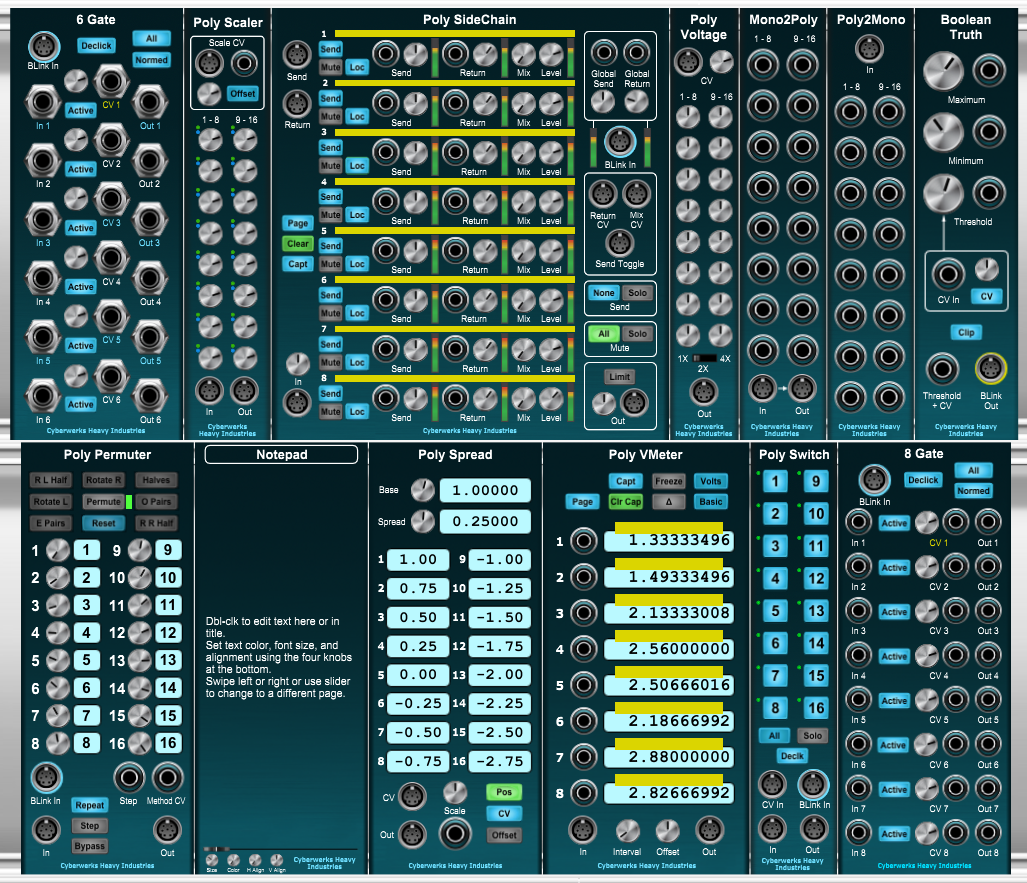
Poly Permuter maps the sixteen channels of a polyphonic input to a polyphonic output on a manual or programmed stochastic basis. In its most basic form this functionality is displayed by the sixteen numbered knobs and display fields that make up the center section of the module; for each numbered channel, the knob determines the channel the input will be mapped to, as shown by the associated display field. This is the simplest way of changing the mapping, but not necessarily the most interesting, although it is the only way to achieve mappings that aren't bijections (i.e., one-to-one and onto).
Controls
The nine buttons in the array at the top of the module each change the mapping in a specified fashion when pressed. They function as follows, in the order they occur in the array:
-
R L Half (Rotate Left Half) rotates the destinations of the lower-numbered half of the channels. For instance, if the number of Poly Voices is set at, say, twelve, then the channels numbered one through six will be rotated.
-
Rotate R (Rotate Right) rotates all channels one position to the right, with the highest rotating around to the lowest position.
-
Halves (Swap left and right halves) swaps the lowest half of the channels with the highest half.
-
Rotate L (Rotate Left) functions identically to Rotate R, save that it rotates in the opposite direction.
-
Permute performs a random permutation of all active channels.
-
O Pairs (Swap Odd Pairs) swaps odd-numbered pairs starting from the outside pairs and working inward.
-
E Pairs (Swap Even Pairs) works like O Pairs, but on even-numbered pairs.
-
Reset returns the mapping to the identity mapping (i.e., one to one, two to two, etc.).
-
R R Half (Rotate Right Half) performs like R L Half, save that it operates on the right (higher-numbered) half of the channels.
Pressing any of these buttons will also update the channel knobs and displays. Pressing more than one of these buttons sequentially has the effect of performing functional composition on the elements of a non-Abelian permutation group.
Things get a bit more interesting if we press the Step button instead of one of the top buttons. This button could have been reasonably named "Stagger," as it causes the module to perform a single step of a Drunkard's Walk over the array of nine buttons, considering the array as wrapping from side-to-side, top-to-bottom, and corner-to-corner (topologically, a homeomorphism of a discrete plane to a discrete sphere). The last executed button is left lit, so you can track the Drunkard's Walk, if you've any interest.
Since connectivity is the name of the game in a modular system, of course there are CV inputs. The Step input jack allows you to feed in anything that could be used as a gate or trigger. The Step signal will trigger a "stagger" each time it rises above the system truth level of 2.5 Volts after having fallen below that level (or, if a BLink input is supplied to the module, above the - possibly modulated - truth level specified in that input).
The Op Enable poly input allows you to specify a subset of the nine buttons programmatically. For any of the first nine channels of Op Enable currently above the truth threshold, the respective button is enabled, and a green LED turned on adjacent to it; all other buttons are disabled, and their LEDs turned off. Only the selected buttons can be triggered or pressed, limiting the possibilities for the Drunkard's Walk. With adroit manipulation of the control signals you can achieve interesting developing patterns in the Walk.
The Repeat button allows states to repeat in the Walk (i.e., the Drunk stays where he is). If this button isn't lit, repeats are not allowed.
The Declick button toggles channel crossfading on and off.
The Bypass button temporarily sets the module to the identity mapping, although the Walk will go on in the background.
The Limit knob sets the number of channels the module considers in use. This affects the way the various permutation buttons function, since they have to fit their specific functionality to the available channels. This can only set values less than or equal to the current setting of Channel Count in the VM interface; if the Limit is set lower than VM's Channel Count, the channels made unavailable have their channel number labels changed to yellow as a visual indicator.
Poly Permuter uses specially entangled mil-spec qubits made available to Cyberwerks by HAL's Mycroft Labs under the auspices of DARPA Grant No. [REDACTED].
No reviews yet. Be the first to review this product!
Poly Permuter
$10.00